> For the complete documentation index, see [llms.txt](https://docs.vida.id/identity-stack/llms.txt). Markdown versions of documentation pages are available by appending `.md` to page URLs; this page is available as [Markdown](https://docs.vida.id/identity-stack/verify/web-sdk/customization.md).
# Customization
## **Workflow Configs**
Customise the liveness detection behavior by adjusting parameters like retry attempts and detection timeouts. This allows you to tailor the liveness verification process to better fit your specific use case.
| Parameter | Type | Required | Description |
| ---------------------- | ------------ | -------- | ---------------------------------------------------------------------------------------------------------------- |
| skipTutorialScreen | boolean | No | Skips the tutorial screen if set to true. |
| skipSelfieReviewScreen | boolean | No | Skips the selfie review screen if set to true. |
| cameraFrameShape | FRAME\_SHAPE | No | Shape of the camera frame overlay. Possible values:"OVAL", "CIRCLE", "SQUARE" & "RECTANGLE" . Defaults to "OVAL" |
| maxRetryAttempts | number | No | Maximum number of retry attempts for BE API call , allowed during liveness detection. Default is 3. |
| detectionTimeOut | number | No | Timeout in milliseconds for face detection. Default is 90000 milliseconds. |
{% hint style="info" %}
Refer to the [**Liveness Verification User Journey**](broken://pages/WURbsD8hR2rbReggCs6K) page for a detailed overview of the user journey and workflow. You can customise or skip specific screens which are non mandatory based on the configuration provided above.
{% endhint %}
***
## **Locale Configs**
Customise specific parts of the liveness workflow to support different languages, ensuring a seamless user experience. Currently, the SDK supports English (EN) and Indonesian (ID).
| Section | Parameters | Description |
| ------------ | -------------------------------------------------------------- | ------------------------------------------------ |
| sessionId | string | Custom label for the session ID. |
| tutorial | [LocaleTutorial](#tutorial-screen-localetutorial) | Localization for tutorial screen texts. |
| camera | [LocaleCamera](#camera-screen-localecamera) | Localization for camera instructions and errors. |
| selfieReview | [LocaleSelfiereview](#selfie-review-screen-localeselfiereview) | Localization for the selfie review screen. |
***
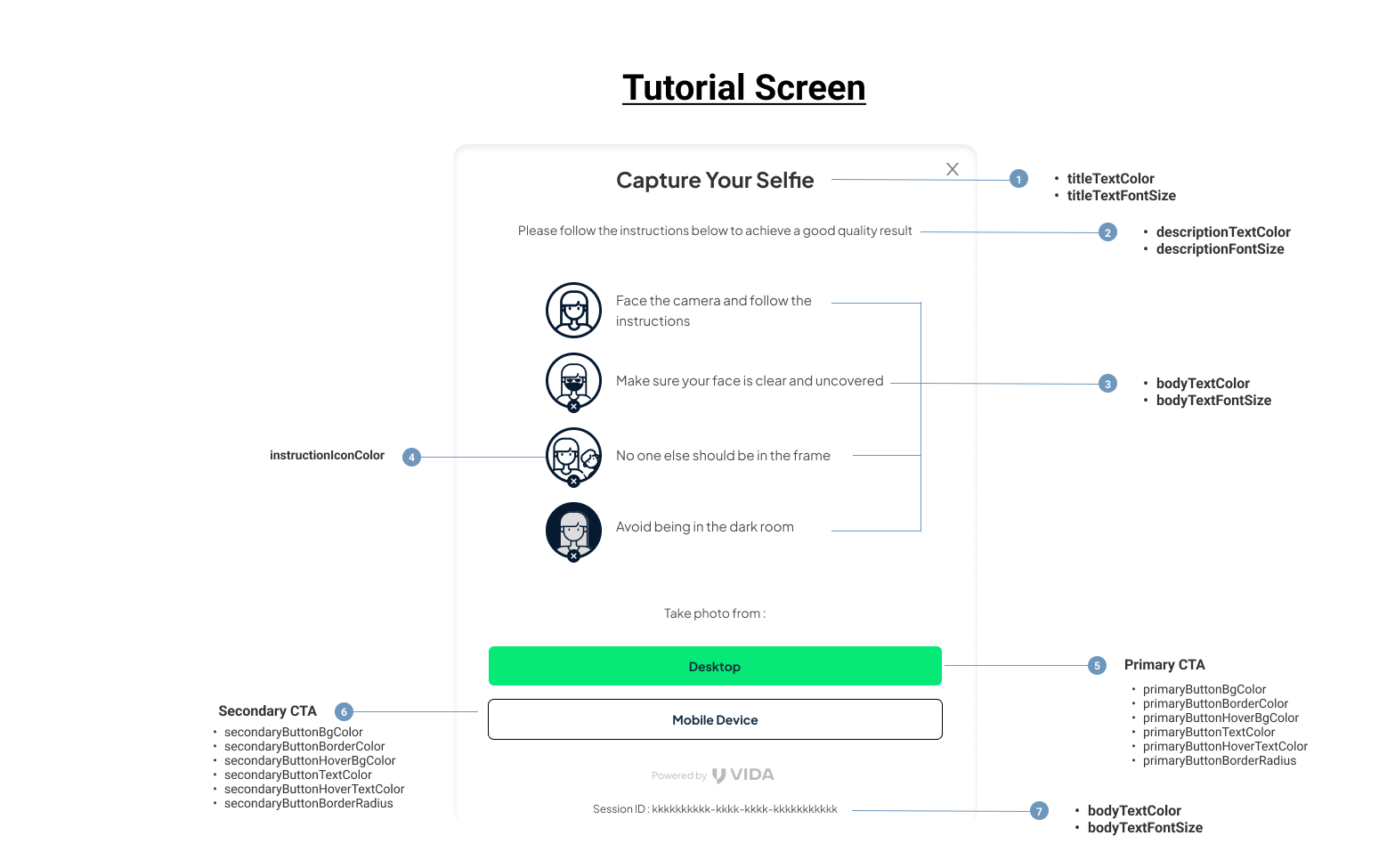
## **Tutorial Screen**
### **Tutorial Screen - LocaleTutorial**
The `LocaleTutorial` parameter allows you to customize the tutorial screen of the liveness workflow. You can modify the instructions, text, and visuals to match the localized language and cultural context of the user.
| Parameter | Type | Required | Description |
| ----------------------- | ------ | -------- | ----------------------------------------------------------------------------------------------------------- |
| title | string | No | The title displayed at the top of the tutorial screen. |
| description | string | No | A brief description or introduction displayed on the tutorial screen, explaining what the user needs to do. |
| instructions | object | No | A set of detailed instructions guiding the user on how to position themselves for successful detection. |
| instructions.faceCamera | string | No | Instruction to face the camera directly. |
| instructions.faceClear | string | No | Instruction to ensure the face is clear and unobstructed. |
| instructions.singleFace | string | No | Instruction to ensure only one face is visible in the frame. |
| instructions.avoidDark | string | No | Instruction to avoid dark environments or ensure sufficient lighting. |
| actionButton | string | No | Label for the button to proceed to the next step after reading the tutorial. |
***
## **Camera Permission Screen**
## Camera Screen
### **Camera Screen - LocaleCamera**
The camera object allows customization of the camera-related UI and messages shown during the liveness detection process.
| Parameter | Type | Required | Description |
| ----------------------- | ------ | -------- | ------------------------------------------------------------------------------------------ |
| permission | object | No | Customizes the text displayed when the SDK requests camera permissions from the user. |
| permission.title | string | No | Title text for the camera permission prompt. |
| permission.description | string | No | Description text explaining why camera access is needed. |
| permission.actionButton | string | No | Label for the button to grant camera permissions. |
| error | object | No | Customizes the text displayed when a camera error occurs. |
| error.title | string | No | Title text for the camera error screen. |
| error.description | string | No | Description text explaining the error. |
| error.actionButton | string | No | Label for the button to retry camera access or fix the error. |
| title | string | No | Title text for the selfie capture screen. |
| description | string | No | Description text explaining camera capture |
| helpText | string | No | Label for the help text below camera view. |
| noFaceDetected | string | No | Message shown when no face is detected in the camera frame. |
| faceDetected | string | No | Message shown when a face is detected in the camera frame. |
| placeFaceinFrame | string | No | Instruction to the user to position their face within the camera frame. |
| multipleFaceDetected | string | No | Message shown when multiple faces are detected in the frame. |
| faceTooFar | string | No | Message shown when the user's face is too far from the camera. |
| faceNotStraight | string | No | Message shown when the user's face is not aligned properly. |
| faceToodark | string | No | Message shown when the user's face is in a dark environment. |
| faceTooBright | string | No | Message shown when the user's face is in a brightly lit environment, causing overexposure. |
| eyesClosed | string | No | Message shown when the user's eyes are closed, preventing accurate detection. |
***
## **Selfie Review Screen**
### **Selfie Review Screen - LocaleSelfiereview**
The `LocaleSelfiereview` parameter enables customization of the selfie review screen within the liveness workflow.
| Parameter | Type | Required | Description |
| --------------------- | ------ | -------- | ----------------------------------------------------------------------------- |
| title | string | No | The title displayed at the top of the selfie review screen. |
| description | string | No | The description text explaining the purpose of the selfie review screen. |
| primaryActionButton | string | No | Label for the primary action button, typically used to confirm the selfie. |
| secondaryActionButton | string | No | Label for the secondary action button, typically used to retake the selfie. |
| backendError\_1041 | string | No | Message displayed when an internal backend error occurs with error code 1041. |
| backendError\_1051 | string | No | Message displayed when an internal backend error occurs with error code 1051. |
| backendError\_1052 | string | No | Message displayed when an internal backend error occurs with error code 1052. |
| backendError\_1053 | string | No | Message displayed when an internal backend error occurs with error code 1053. |
| backendError\_1054 | string | No | Message displayed when an internal backend error occurs with error code 1054. |
| backendError\_1055 | string | No | Message displayed when an internal backend error occurs with error code 1055. |
| backendError\_1058 | string | No | Message displayed when an internal backend error occurs with error code 1058. |
| backendError\_1059 | string | No | Message displayed when an internal backend error occurs with error code 1059. |
| backendError\_1060 | string | No | Message displayed when an internal backend error occurs with error code 1060. |
| backendError\_1062 | string | No | Message displayed when an internal backend error occurs with error code 1062. |
| backendError\_1063 | string | No | Message displayed when an internal backend error occurs with error code 1063. |
| backendError\_1064 | string | No | Message displayed when an internal backend error occurs with error code 1064. |
| backendError\_1074 | string | No | Message displayed when an internal backend error occurs with error code 1074. |
| backendError\_1065 | string | No | Message displayed when an internal backend error occurs with error code 1065. |
| backendError\_1075 | string | No | Message displayed when an internal backend error occurs with error code 1075. |
| backendError\_1066 | string | No | Message displayed when an internal backend error occurs with error code 1066. |
| backendError\_1076 | string | No | Message displayed when an internal backend error occurs with error code 1076. |
***
## English - Default Locale Strings
```json
{
"sessionId": "Session ID",
"tutorial": {
"title": "Liveness Verification",
"description": "Make sure you carefully read each instruction",
"instructions": {
"faceCamera": "Face the camera and follow the instructions",
"faceClear": "Ensure your face is clear and uncovered",
"singleFace": "Make sure no one else is visible in the frame",
"avoidDark": "Avoid being in a dark room"
},
"actionButton": "Start Verification"
},
"camera": {
"permission": {
"title": "Allow Camera Access",
"description": "To continue, please enable camera access. We cannot verify your identity without using your camera.",
"actionButton": "Allow"
},
"error": {
"title": "The camera is either not supported or the access is denied.",
"description": "If you denied camera access by mistake, follow these steps: 1. Open your browser settings. 2. Under Privacy and Security, select Site Settings. 3. Under Permissions, choose Camera and toggle the button to enable access. 4. Once done, click 'Retry' below.",
"actionButton": "Retry"
},
"title": "Capture Your Selfie",
"description": "Follow the instructions provided and ensure your face is clearly visible",
"noFaceDetected": "Unable to detect the face",
"faceDetected": "Stay still to capture a clear photo",
"placeFaceinFrame": "Place your face in the frame",
"multipleFaceDetected": "Ensure no additional faces are visible in the frame",
"faceTooFar": "Bring your face closer",
"faceNotStraight": "Keep your face straight",
"faceToodark": "Face area too dark",
"faceTooBright": "Face area too bright",
"eyesClosed": "Make sure your eyes are open and visible"
},
"selfieReview": {
"title": "Review Photo",
"description": "Ensure the image is well-lit, clear, and that all features are visible",
"primaryActionButton": "Submit Photo",
"secondaryActionButton": "Retake Selfie",
"backendError_1041": "Liveness verification failed",
"backendError_1051": "Clear obstruction from the face",
"backendError_1052": "Bring your face closer",
"backendError_1053": "Please ensure the lighting is sufficient and the photo is clear",
"backendError_1054": "Ensure no additional faces are visible in the frame",
"backendError_1055": "Unable to detect the face",
"backendError_1058": "Please ensure the lighting is sufficient and the photo is clear",
"backendError_1059": "The selfie is blurry, hold your phone steady",
"backendError_1060": "Keep your face straight",
"backendError_1062": "Please ensure to open your eyes"
}
```
***
## Indonesian (Bahasa) - Default Locale Strings
```json
{
"sessionId": "ID Sesi",
"tutorial": {
"title": "Verifikasi Keaktifan",
"description": "Pastikan Anda membaca setiap instruksi yang diberikan",
"instructions": {
"faceCamera": "Hadapkan wajah Anda ke kamera dan ikuti instruksinya",
"faceClear": "Pastikan wajah Anda terlihat jelas dan tidak tertutupi",
"singleFace": "Pastikan tidak ada orang lain dalam frame",
"avoidDark": "Hindari berada di ruangan yang gelap"
},
"actionButton": "Mulai Verifikasi"
},
"camera": {
"permission": {
"title": "Izinkan akses kamera",
"description": "Untuk melanjutkan, Anda perlu mengizinkan akses kamera. Kami tidak dapat memverifikasi Anda tanpa menggunakan kamera.",
"actionButton": "Izinkan"
},
"error": {
"title": "Kamera tidak didukung atau akses ditolak.",
"description": "Jika Anda tidak sengaja menolak akses kamera, ikuti langkah-langkah berikut: 1. Buka Pengaturan Browser Anda. 2. Di bawah Privasi dan Keamanan, pilih Setelan Situs. 3. Di bagian Izin, pilih Kamera dan ketuk tombolnya untuk memberikan akses. 4. Setelah selesai, ketuk 'Coba Lagi' pada bagian bawah.",
"actionButton": "Coba kembali"
},
"title": "Ambil Swafoto",
"description": "Ikuti petunjuk yang diberikan dan pastikan wajah Anda terlihat jelas",
"noFaceDetected": "Gagal mendeteksi wajah",
"faceDetected": "Tetap diam agar foto tampak jelas",
"placeFaceinFrame": "Pastikan wajah di dalam bingkai",
"multipleFaceDetected": "Pastikan hanya satu wajah di layar",
"faceTooFar": "Dekatkan wajah ke bingkai",
"faceNotStraight": "Pastikan wajah menghadap kamera",
"faceToodark": "Area wajah terlalu gelap",
"faceTooBright": "Area wajah terlalu terang",
"eyesClosed": "Pastikan mata tidak tertutup"
},
"selfieReview": {
"title": "Tinjau Foto",
"description": "Pastikan pencahayaan foto baik dan tampak jelas",
"primaryActionButton": "Kirim Foto",
"secondaryActionButton": "Ulangi Selfie",
"backendError_1041": "Verifikasi liveness gagal",
"backendError_1051": "Singkirkan penghalang dari wajah",
"backendError_1052": "Dekatkan wajah ke bingkai",
"backendError_1053": "Pastikan pencahayaan cukup agar foto terlihat jelas",
"backendError_1054": "Pastikan hanya satu wajah di layar",
"backendError_1055": "Tidak dapat mendeteksi wajah",
"backendError_1058": "Pastikan pencahayaan cukup agar foto terlihat jelas",
"backendError_1059": "Swafoto buram, pastikan perangkat stabil",
"backendError_1060": "Pastikan wajah menghadap kamera",
"backendError_1062": "Pastikan mata tidak tertutup",
"backendError_1063": "Pastikan pencahayaan cukup agar foto terlihat jelas",
"backendError_1064": "Swafoto terlalu gelap, pastikan pencahayaannya cukup agar foto terlihat jelas",
"backendError_1074": "Swafoto terlalu gelap, pastikan pencahayaannya cukup agar foto terlihat jelas",
"backendError_1065": "Swafoto terlalu terang, atur pencahayaan agar foto terlihat jelas",
"backendError_1075": "Swafoto terlalu terang, atur pencahayaan agar foto terlihat jelas",
"backendError_1066": "Swafoto buram, pastikan perangkat stabil",
"backendError_1076": "Swafoto buram, pastikan perangkat stabil"
}
}
```
***
## **Theme configs**
The themeConfigs object customizes the appearance of the SDK’s user interface (UI), allowing you to align it with your brand’s design guidelines. Below is a detailed breakdown of each parameter
Here’s the detailed table for the parameters:
| **Parameter** | **Type** | **Required** | **Description** |
| ------------------------------- | -------- | ------------ | --------------------------------------------------------------------------------------------------------- |
| primaryButtonBgColor | string | No | Background color of the primary action buttons. |
| primaryButtonBorderColor | string | No | Border color of the primary action buttons. |
| primaryButtonHoverBgColor | string | No | Background color of the primary buttons when hovered over. |
| primaryButtonTextColor | string | No | Text color of the primary action buttons. |
| primaryButtonHoverTextColor | string | No | Text color of the primary buttons when hovered over. |
| primaryButtonBorderRadius | string | No | Border radius of the primary action buttons. Accepts CSS values (e.g., `5px`, `50%` for rounded buttons). |
| secondaryButtonBgColor | string | No | Background color of the secondary action buttons. |
| secondaryButtonBorderColor | string | No | Border color of the secondary action buttons. |
| secondaryButtonHoverBgColor | string | No | Background color of the secondary buttons when hovered over. |
| secondaryButtonTextColor | string | No | Text color of the secondary action buttons. |
| secondaryButtonHoverTextColor | string | No | Text color of the secondary buttons when hovered over. |
| secondaryButtonBorderRadius | string | No | Border radius of the secondary action buttons. |
| titleTextColor | string | No | Color of the text used in titles across the SDK. |
| titleTextFontSize | string | No | Font size of the text used in titles. Accepts CSS values (e.g., `16px`, `1em`). |
| descriptionTextColor | string | No | Color of the text used in descriptions. |
| descriptionFontSize | string | No | Font size of the text used in descriptions. |
| bodyTextColor | string | No | Color of the text used in the main body content. |
| bodyTextFontSize | string | No | Font size of the text used in the main body content. |
| fontFamily | string | No | Font family for all text in the SDK (e.g., `"Arial, sans-serif"`). |
| fontFamilyUrl | string | No | URL of the font to be loaded (useful for custom web fonts). |
| instructionIconColor | string | No | Color of the icons used for instructions on tutorial screens. |
| loadingSpinnerColor | string | No | Color of the loading spinner animation. |
| cameraFrameBorderInitialColor | string | No | Initial border color of the camera frame overlay. |
| cameraFrameBorderAnimationColor | string | No | Border color of the camera frame overlay during animations (e.g., scanning). |
| cameraFrameOverlayColor | string | No | Color of the semi-transparent overlay around the camera frame. |
| cameraInstructionTextColor | string | No | Text color of the instructions provided in the camera stream. |
| cameraInstructionBgColor | string | No | Background color of the instructions provided in the camera stream. |
| cameraInstructionFontSize | string | No | Text font size of the instructions provided in the camera stream. |
| errorAlertBgColor | string | No | Background color of the error alerts displayed in the SDK flow. |
| errorAlertTextColor | string | No | Text color of the error alerts displayed in the SDK flow. |
| backButtonColor | string | No | Color of the back button in the SDK screens. |
| modalCloseButtonColor | string | No | Color of the close button in modal dialogs. |
| errorAlertTextFontSize | string | No | Font size of the error messages displayed in the SDK. |
| sessionIdFontSize | string | No | Font size of the session ID text. |
| backgroundColor | string | No | Background color for the entire SDK interface. |
For all color-related parameters in the `themeConfigs`, you can use any valid CSS color format, including:
* **Hexadecimal:** #007bff, #ffffff, etc.
* **RGB**: rgb(0, 123, 255), rgb(255, 255, 255), etc.
* **Named Colors:** red, blue, green, etc.
An example theme config
```json
{
"themeConfigs": {
"primaryButtonBgColor": "#007bff",
"primaryButtonBorderColor": "#0056b3",
"primaryButtonHoverBgColor": "#0056b3",
"primaryButtonTextColor": "#ffffff",
"primaryButtonHoverTextColor": "#e0e0e0",
"primaryButtonBorderRadius": "5px",
"secondaryButtonBgColor": "#f8f9fa",
"secondaryButtonBorderColor": "#ced4da",
"secondaryButtonHoverBgColor": "#e9ecef",
"secondaryButtonTextColor": "#495057",
"secondaryButtonHoverTextColor": "#212529",
"secondaryButtonBorderRadius": "5px",
"titleTextColor": "#343a40",
"titleTextFontSize": "18px",
"descriptionTextColor": "#6c757d",
"descriptionFontSize": "14px",
"bodyTextColor": "#212529",
"bodyTextFontSize": "14px",
"fontFamily": "'Roboto', sans-serif",
"fontFamilyUrl": "https://fonts.googleapis.com/css2?family=Roboto:wght@400;700&display=swap",
"instructionIconColor": "#007bff",
"loadingSpinnerColor": "#007bff",
"cameraFrameBorderInitialColor": "#28a745",
"cameraFrameBorderAnimationColor": "#dc3545",
"cameraFrameOverlayColor": "rgba(0, 0, 0, 0.5)",
"cameraErrorAlertBgColor": "#ffc107",
"cameraErrorAlertTextColor": "#212529",
"backButtonColor": "#007bff",
"modalCloseButtonColor": "#6c757d",
"errorAlertTextColor": "red",
"errorAlertTextFontSize": "14px",
"backgroundColor": "white"
}
}
```