Customization
Workflow Configs
Customise the liveness detection behaviour by adjusting parameters like retry attempts and detection timeouts. This allows you to tailor the liveness verification process to better fit your specific use case.
skipTutorialScreen
boolean
No
Skips the tutorial screen if set to true.
skipSelfieReviewScreen
boolean
No
Skips the selfie review screen if set to true.
cameraFrameShape
FRAME_SHAPE
No
Shape of the camera frame overlay. Possible values:"OVAL", "CIRCLE", "SQUARE" & "RECTANGLE" . Defaults to "OVAL"
maxRetryAttempts
number
No
Maximum number of retry attempts for BE API call , allowed during liveness detection. Default is 3.
detectionTimeOut
number
No
Timeout in milliseconds for face detection. Default is 90000 milliseconds.
detectionTimeOutCountdownDuration
number
No
Timeout in milliseconds for face detection countdown. If you pass 30000 countdown will be shown for last 30 seconds . Default is for last 20000 ms (20 seconds)
hideDetectionTimeOutCountdownAlert
boolean
No
pass this true if countdown alert needs to be hidden . Default is false. (Supported from v1.1.0)
skipDarkLightingScreenFlash
boolean
No
pass this true if you do not want the screen to flash white when dark area is detected. (Supported from v1.1.0)
hideStaticHeadShape
boolean
No
pass this true if you want to hide the static head shape inside the frame during selfie capture. (Supported from v1.1.0)
hideDescriptions
object
No
If any of these not passed, by default description will be shown in all screens. Pass true to hide page description from the screen.
tutorial - Selfie capture tutorial screen cameraAccess - Camera access screen camera - Selfie capture screen selfieReview - Selfie review screen
hideErrorCodeOnSelfieReview
boolean
No
pass this true if you want to hide error code displayed on selfie review screen error section.
hideMaxRetryError
boolean
no
pass this true if you want to hide Maximum retry exhausted error alert on selfie review screen error section.
Locale Configs
Customise specific parts of the liveness workflow to support different languages, ensuring a seamless user experience. Currently, the SDK supports English (EN) and Indonesian (ID).
Section
Parameters
Description
sessionId
string
Custom label for the session ID.
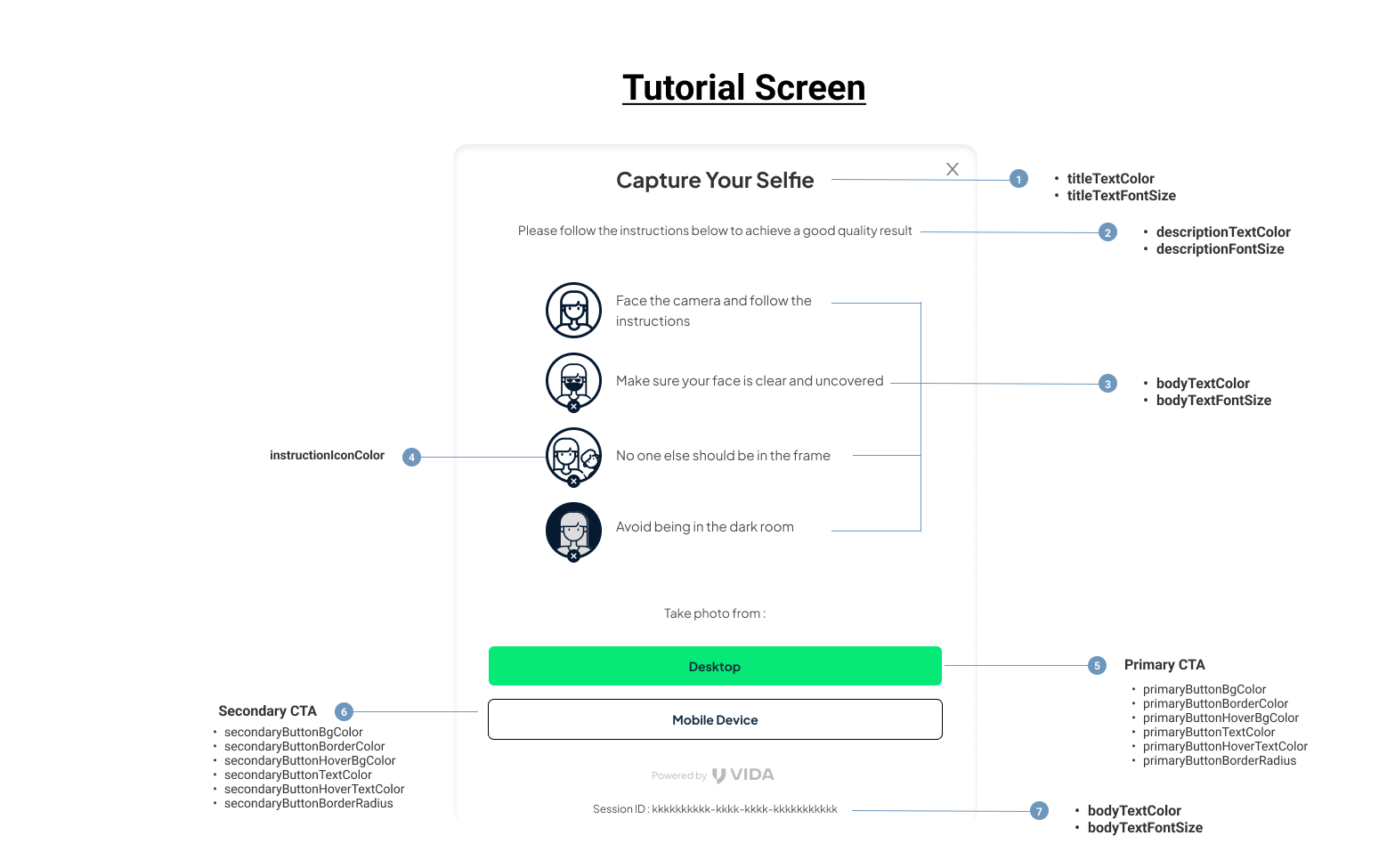
Tutorial Screen

Tutorial Screen - LocaleTutorial
The LocaleTutorial parameter allows you to customize the tutorial screen of the liveness workflow. You can modify the instructions, text, and visuals to match the localized language and cultural context of the user.
Parameter
Type
Required
Description
title
string
No
The title displayed at the top of the tutorial screen.
description
string
No
A brief description or introduction displayed on the tutorial screen, explaining what the user needs to do.
instructions
object
No
A set of detailed instructions guiding the user on how to position themselves for successful detection.
instructions.faceCamera
string
No
Instruction to face the camera directly. Deprecated from v1.1.0
instructions.faceClear
string
No
Instruction to ensure the face is clear and unobstructed. Deprecated from v1.1.0
instructions.singleFace
string
No
Instruction to ensure only one face is visible in the frame. Deprecated from v1.1.0
instructions.avoidDark
string
No
Instruction to avoid dark environments or ensure sufficient lighting. Deprecated from v1.1.0
instructions.holdPhoneSteady
string
No
Instruction to hold the device steadily. Supported from v1.1.0
instructions.avoidBrightPlace
string
No
Instruction to avoid dark environments or ensure sufficient lighting. Supported from v1.1.0 & applicable for color flash
instructions.avoidGlasses
string
No
Instruction to avoid wearing the glasses. Supported from v1.1.0 & applicable for color flash
actionButton
string
No
Label for the button to proceed to the next step after reading the tutorial.
Camera Permission Screen


Camera Screen

Camera Screen - LocaleCamera
The camera object allows customization of the camera-related UI and messages shown during the liveness detection process.
Parameter
Type
Required
Description
permission
object
No
Customizes the text displayed when the SDK requests camera permissions from the user.
permission.title
string
No
Title text for the camera permission prompt.
permission.description
string
No
Description text explaining why camera access is needed.
permission.actionButton
string
No
Label for the button to grant camera permissions.
error
object
No
Customizes the text displayed when a camera error occurs.
error.title
string
No
Title text for the camera error screen.
error.description
string
No
Description text explaining the error.
error.actionButton
string
No
Label for the button to retry camera access or fix the error.
title
string
No
Title text for the selfie capture screen.
description
string
No
Description text explaining camera capture
helpText
string
No
Label for the help text below camera view.
noFaceDetected
string
No
Message shown when no face is detected in the camera frame.
faceDetected
string
No
Message shown when a face is detected in the camera frame.
placeFaceinFrame
string
No
Instruction to the user to position their face within the camera frame.
multipleFaceDetected
string
No
Message shown when multiple faces are detected in the frame.
faceTooFar
string
No
Message shown when the user's face is too far from the camera.
faceNotStraight
string
No
Message shown when the user's face is not aligned properly.
faceToodark
string
No
Message shown when the user's face is in a dark environment.
faceTooBright
string
No
Message shown when the user's face is in a brightly lit environment, causing overexposure.
eyesClosed
string
No
Message shown when the user's eyes are closed, preventing accurate detection.
Selfie Review Screen

Selfie Review Screen - LocaleSelfiereview
The LocaleSelfiereview parameter enables customization of the selfie review screen within the liveness workflow.
Parameter
Type
Required
Description
title
string
No
The title displayed at the top of the selfie review screen.
description
string
No
The description text explaining the purpose of the selfie review screen.
primaryActionButton
string
No
Label for the primary action button, typically used to confirm the selfie.
secondaryActionButton
string
No
Label for the secondary action button, typically used to retake the selfie.
backendError_1041
string
No
Message displayed when an internal backend error occurs with error code 1041.
backendError_1051
string
No
Message displayed when an internal backend error occurs with error code 1051.
backendError_1052
string
No
Message displayed when an internal backend error occurs with error code 1052.
backendError_1053
string
No
Message displayed when an internal backend error occurs with error code 1053.
backendError_1054
string
No
Message displayed when an internal backend error occurs with error code 1054.
backendError_1055
string
No
Message displayed when an internal backend error occurs with error code 1055.
backendError_1058
string
No
Message displayed when an internal backend error occurs with error code 1058.
backendError_1059
string
No
Message displayed when an internal backend error occurs with error code 1059.
backendError_1060
string
No
Message displayed when an internal backend error occurs with error code 1060.
backendError_1062
string
No
Message displayed when an internal backend error occurs with error code 1062.
backendError_1063
string
No
Message displayed when an internal backend error occurs with error code 1063.
backendError_1064
string
No
Message displayed when an internal backend error occurs with error code 1064.
backendError_1074
string
No
Message displayed when an internal backend error occurs with error code 1074.
backendError_1065
string
No
Message displayed when an internal backend error occurs with error code 1065.
backendError_1075
string
No
Message displayed when an internal backend error occurs with error code 1075.
backendError_1066
string
No
Message displayed when an internal backend error occurs with error code 1066.
backendError_1076
string
No
Message displayed when an internal backend error occurs with error code 1076.
English - Default Locale Strings
Indonesian (Bahasa) - Default Locale Strings
Theme configs
The themeConfigs object customizes the appearance of the SDK’s user interface (UI), allowing you to align it with your brand’s design guidelines. Below is a detailed breakdown of each parameter
Here’s the detailed table for the parameters:
Parameter
Type
Required
Description
primaryButtonBgColor
string
No
Background color of the primary action buttons.
primaryButtonBorderColor
string
No
Border color of the primary action buttons.
primaryButtonHoverBgColor
string
No
Background color of the primary buttons when hovered over.
primaryButtonTextColor
string
No
Text color of the primary action buttons.
primaryButtonHoverTextColor
string
No
Text color of the primary buttons when hovered over.
primaryButtonBorderRadius
string
No
Border radius of the primary action buttons. Accepts CSS values (e.g., 5px, 50% for rounded buttons).
secondaryButtonBgColor
string
No
Background color of the secondary action buttons.
secondaryButtonBorderColor
string
No
Border color of the secondary action buttons.
secondaryButtonHoverBgColor
string
No
Background color of the secondary buttons when hovered over.
secondaryButtonTextColor
string
No
Text color of the secondary action buttons.
secondaryButtonHoverTextColor
string
No
Text color of the secondary buttons when hovered over.
secondaryButtonBorderRadius
string
No
Border radius of the secondary action buttons.
titleTextColor
string
No
Color of the text used in titles across the SDK.
titleTextFontSize
string
No
Font size of the text used in titles. Accepts CSS values (e.g., 16px, 1em).
descriptionTextColor
string
No
Color of the text used in descriptions.
descriptionFontSize
string
No
Font size of the text used in descriptions.
bodyTextColor
string
No
Color of the text used in the main body content.
bodyTextFontSize
string
No
Font size of the text used in the main body content.
fontFamily
string
No
Font family for all text in the SDK (e.g., "Arial, sans-serif").
fontFamilyUrl
string
No
URL of the font to be loaded (useful for custom web fonts).
instructionIconColor
string
No
Color of the icons used for instructions on tutorial screens.
loadingSpinnerColor
string
No
Color of the loading spinner animation.
cameraFrameBorderInitialColor
string
No
Initial border color of the camera frame overlay.
cameraFrameBorderAnimationColor
string
No
Border color of the camera frame overlay during animations (e.g., scanning).
cameraFrameOverlayColor
string
No
Color of the semi-transparent overlay around the camera frame.
cameraInstructionTextColor
string
No
Text color of the instructions provided in the camera stream.
cameraInstructionBgColor
string
No
Background color of the instructions provided in the camera stream.
cameraInstructionFontSize
string
No
Text font size of the instructions provided in the camera stream.
errorAlertBgColor
string
No
Background color of the error alerts displayed in the SDK flow.
errorAlertTextColor
string
No
Text color of the error alerts displayed in the SDK flow.
backButtonColor
string
No
Color of the back button in the SDK screens.
modalCloseButtonColor
string
No
Color of the close button in modal dialogs.
errorAlertTextFontSize
string
No
Font size of the error messages displayed in the SDK.
sessionIdFontSize
string
No
Font size of the session ID text.
backgroundColor
string
No
Background color for the entire SDK interface.
For all color-related parameters in the themeConfigs, you can use any valid CSS color format, including:
Hexadecimal: #007bff, #ffffff, etc.
RGB: rgb(0, 123, 255), rgb(255, 255, 255), etc.
Named Colors: red, blue, green, etc.
An example theme config
Last updated
